In 2013, we’ve seen several major changes in the SEO landscape, such as Google Hummingbird and Penguin updates. Here's how to interpret these changes, and what you need to do to maximize sales and ROI on Black Friday, Cyber Monday, and beyond.


Thursday, October 31, 2013

Content Marketing for Small Business: The Five Ws
Do everything you can to get your good content out there and follow its traction. Even if you're a small business, you can think big in your content and overall business strategy. Here's how to use the five Ws to mold your content.


Winning Strategies to Lose Money With Infographics
Google is getting a bit absurd with suggesting that any form of content creation that drives links should include rel=nofollow. Certainly some techniques may be abused, but if you follow the suggested advice, you are almost guaranteed to have a negative ROI on each investment - until your company goes under.
Some will ascribe such advice as taking a "sustainable" and "low-risk" approach, but such strategies are only "sustainable" and "low-risk" so long as ROI doesn't matter & you are spending someone else's money.
The advice on infographics in the above video suggests that embed code by default should include nofollow links.
Companies can easily spend at least $2,000 to research, create, revise & promote an infographic. And something like 9 out of 10 infographics will go nowhere. That means you are spending about $20,000 for each successful viral infographic. And this presumes that you know what you are doing. Mix in a lack of experience, poor strategy, poor market fit, or poor timing and that cost only goes up from there.
If you run smaller & lesser known websites, quite often Google will rank a larger site that syndicates the infographic above the original source. They do that even when the links are followed. Mix in nofollow on the links and it is virtually guaranteed that you will get outranked by someone syndicating your infographic.
So if you get to count as duplicate content for your own featured premium content that you dropped 4 or 5 figures on AND you don't get links out of it, how exactly does the investment ever have any chance of backing out?
Sales?
Not a snowball's chance in hell.
An infographic created around "the 10 best ways you can give me your money" won't spread. And if it does spread, it will be people laughing at you.
I also find it a bit disingenuous the claim that people putting something that is 20,000 pixels large on their site are not actively vouching for it. If something was crap and people still felt like burning 20,000 pixels on syndicating it, surely they could add nofollow on their end to express their dissatisfaction and disgust with the piece.
Many dullards in the SEO industry give Google a free pass on any & all of their advice, as though it is always reasonable & should never be questioned. And each time it goes unquestioned, the ability to exist in the ecosystem as an independent player diminishes as the entire industry moves toward being classified as some form of spam & getting hit or not depends far more on who than what .
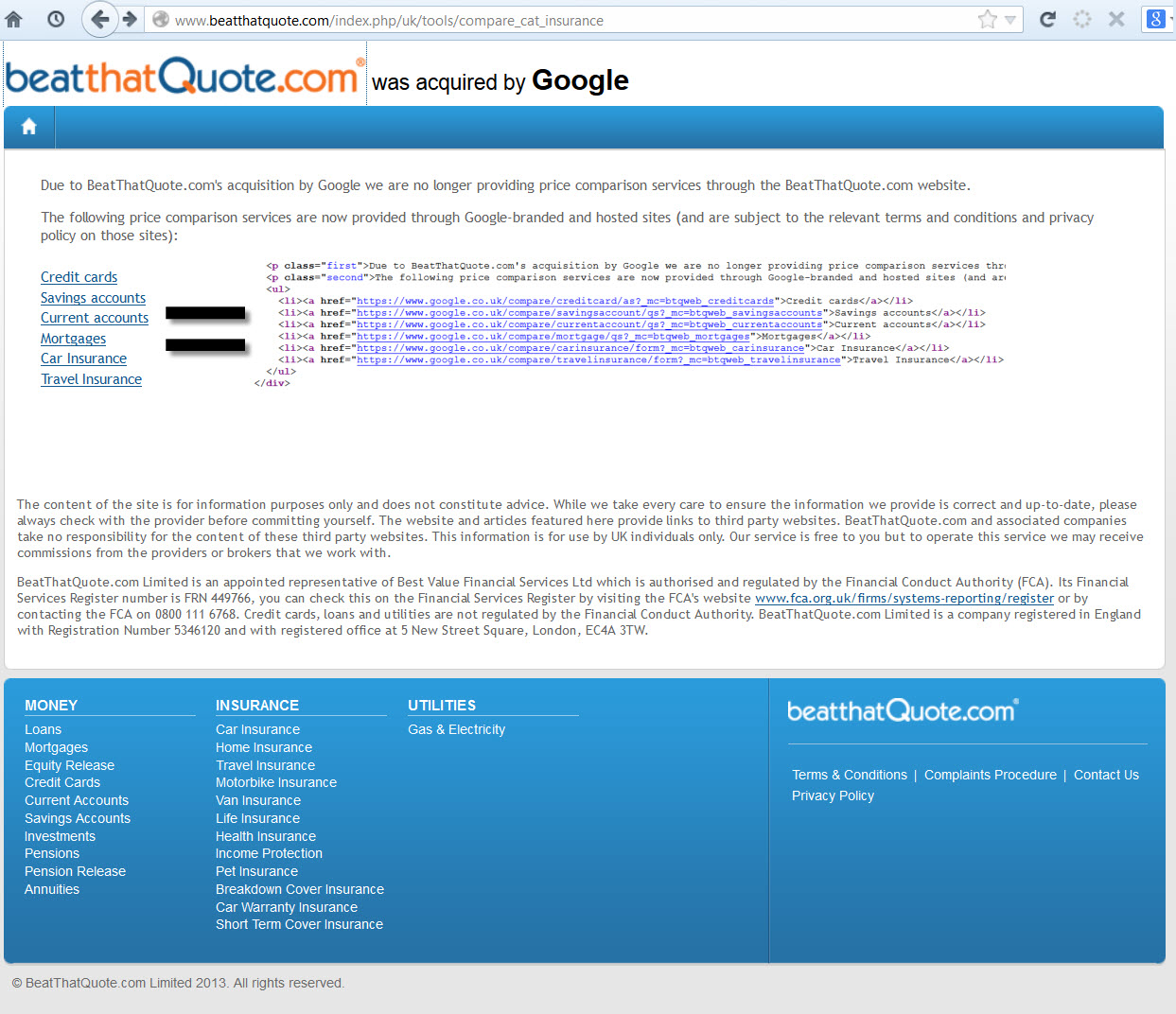
Does Google's recent automated infographic generator give users embed codes with nofollow on the links? Not at all. Instead they give you the URL without nofollow & those URLs are canonicalized behind the scenes to flow the link equity into the associated core page.
No cost cut-n-paste mix-n-match = direct links. Expensive custom research & artwork = better use nofollow, just to be safe.
If Google actively adds arbitrary risks to some players while subsidizing others then they shift the behaviors of markets. And shift the markets they do!
Years ago Twitter allowed people who built their platform to receive credit links in their bio. Matt Cutts tipped off Ev Williams that the profile links should be nofollowed & that flow of link equity was blocked.
It was revealed in the WSJ that in 2009 Twitter's internal metrics showed an 11% spammy Tweet rate & Twitter had a grand total of 2 "spam science" programmers on staff in 2012.
With smaller sites, they need to default everything to nofollow just in case anything could potentially be construed (or misconstrued) to have the intent to perhaps maybe sorta be aligned potentially with the intent to maybe sorta be something that could maybe have some risk of potentially maybe being spammy or maybe potentially have some small risk that it could potentially have the potential to impact rank in some search engine at some point in time, potentially.
A larger site can have over 10% of their site be spam (based on their own internal metrics) & set up their embed code so that the embeds directly link - and they can do so with zero risk.
@phillian Like all empires, ultimately Google will be the root of its own demise.— Cygnus SEO (@CygnusSEO) August 13, 2013
I just linked to Twitter twice in the above embed. If those links were directly to Cygnus it may have been presumed that either he or I are spammers, but put the content on Twitter with 143,199 Tweets in a second & those links are legit & clean. Meanwhile, fake Twitter accounts have grown to such a scale that even Twitter is now buying them to try to stop them. Twitter's spam problem was so large that once they started to deal with spam their growth estimates dropped dramatically:
CEO Dick Costolo told employees he expected to get to 400 million users by the end of 2013, according to people familiar with the company.
Sources said that Twitter now has around 240 million users, which means it has been adding fewer than 4.5 million users a month in 2013. If it continues to grow at that rate, it would end this year around the 260 million mark — meaning that its user base would have grown by about 30 percent, instead of Costolo’s 100 percent goal.
Typically there is no presumed intent to spam so long as the links are going into a large site (sure there are a handful of token counter-examples shills can point at). By and large it is only when the links flow out to smaller players that they are spam. And when they do, they are presumed to be spam even if they point into featured content that cost thousands of Dollars. You better use nofollow, just to play it safe!
That duality is what makes blind unquestioning adherence to Google scripture so unpalatable. A number of people are getting disgusted enough by it that they can't help but comment on it: David Naylor, Martin Macdonald & many others DennisG highlighted.
Oh, and here's an infographic for your pleasurings.

Google: Press Release Links
So, Google have updated their Webmaster Guidelines.
Here are a few common examples of unnatural links that violate our guidelines:....Links with optimized anchor text in articles or press releases distributed on other sites.
For example: There are many wedding rings on the market. If you want to have a wedding, you will have to pick the best ring. You will also need to buy flowers and a wedding dress.
In particular, they have focused on links with optimized anchor text in articles or press releases distributed on other sites. Google being Google, these rules are somewhat ambiguous. “Optimized anchor text”? The example they provide includes keywords in the anchor text, so keywords in the anchor text is “optimized” and therefore a violation of Google’s guidelines.
Ambiguously speaking, of course.
To put the press release change in context, Google’s guidelines state:
Any links intended to manipulate PageRank or a site's ranking in Google search results may be considered part of a link scheme and a violation of Google’s Webmaster Guidelines. This includes any behavior that manipulates links to your site or outgoing links from your site
So, links gained, for SEO purposes - intended to manipulate ranking - are against Google Guidelines.
Google vs Webmasters
Here’s a chat...
In this chat, Google’s John Muller says that, if the webmaster initiated it, then it isn't a natural link. If you want to be on the safe side, John suggests to use no-follow on links.
Google are being consistent, but what’s amusing is the complete disconnect on display from a few of the webmasters. Google have no problem with press releases, but if a webmaster wants to be on the safe side in terms of Google’s guidelines, the webmaster should no-follow the link.
Simple, right. If it really is a press release, and not an attempt to link build for SEO purposes, then why would a webmaster have any issue with adding a no-follow to a link?
He/she wouldn't.
But because some webmasters appear to lack self-awareness about what it is they are actually doing, they persist with their line of questioning. I suspect what they really want to hear is “keyword links in press releases are okay." Then, webmasters can continue to issue pretend press releases as a link building exercise.
They're missing the point.
Am I Taking Google’s Side?
Not taking sides.
Just hoping to shine some light on a wider issue.
If webmasters continue to let themselves be defined by Google, they are going to get defined out of the game entirely. It should be an obvious truth - but sadly lacking in much SEO punditry - that Google is not on the webmasters side. Google is on Google’s side. Google often say they are on the users side, and there is certainly some truth in that.
However,when it comes to the webmaster, the webmaster is a dime-a-dozen content supplier who must be managed, weeded out, sorted and categorized. When it comes to the more “aggressive” webmasters, Google’s behaviour could be characterized as “keep your friends close, and your enemies closer”.
This is because some webmasters, namely SEOs, don’t just publish content for users, they compete with Google’s revenue stream. SEOs offer a competing service to click based advertising that provides exactly the same benefit as Google's golden goose, namely qualified click traffic.
If SEOs get too good at what they do, then why would people pay Google so much money per click? They wouldn’t - they would pay it to SEOs, instead. So, if I were Google, I would see SEO as a business threat, and manage it - down - accordingly. In practice, I’d be trying to redefine SEO as “quality content provision”.
Why don't Google simply ignore press release links? Easy enough to do. Why go this route of making it public? After all, Google are typically very secret about algorithmic topics, unless the topic is something they want you to hear. And why do they want you to hear this? An obvious guess would be that it is done to undermine link building, and SEOs.
Big missiles heading your way.
Guideline Followers
The problem in letting Google define the rules of engagement is they can define you out of the SEO game, if you let them.
If an SEO is not following the guidelines - guidelines that are always shifting - yet claim they do, then they may be opening themselves up to legal liability. In one recent example, a case is underway alleging lack of performance:
Last week, the legal marketing industry was aTwitter (and aFacebook and even aPlus) with news that law firm Seikaly & Stewart had filed a lawsuit against The Rainmaker Institute seeking a return of their $49,000 in SEO fees and punitive damages under civil RICO
.....but it’s not unreasonable to expect a somewhat easier route for litigants in the future might be “not complying with Google’s guidelines”, unless the SEO agency disclosed it.
SEO is not the easiest career choice, huh.
One group that is likely to be happy about this latest Google push is legitimate PR agencies, media-relations departments, and publicists. As a commenter on WMW pointed out:
I suspect that most legitimate PR agencies, media-relations departments, and publicists will be happy to comply with Google's guidelines. Why? Because, if the term "press release" becomes a synonym for "SEO spam," one of the important tools in their toolboxes will become useless.
Just as real advertisers don't expect their ads to pass PageRank, real PR people don't expect their press releases to pass PageRank. Public relations is about planting a message in the media, not about manipulating search results
However, I’m not sure that will mean press releases are seen as any more credible, as press releases have never enjoyed a stellar reputation pre-SEO, but it may thin the crowd somewhat, which increases an agencies chances of getting their client seen.
Guidelines Honing In On Target
One resource referred to in the video above was this article, written by Amit Singhal, who is head of Google’s core ranking team. Note that it was written in 2011, so it’s nothing new. Here’s how Google say they determine quality:
we aren't disclosing the actual ranking signals used in our algorithms because we don't want folks to game our search results; but if you want to step into Google's mindset, the questions below provide some guidance on how we've been looking at the issue:
- Would you trust the information presented in this article?
- Is this article written by an expert or enthusiast who knows the topic well, or is it more shallow in nature?
- Does the site have duplicate, overlapping, or redundant articles on the same or similar topics with slightly different keyword variations?
- Are the topics driven by genuine interests of readers of the site, or does the site generate content by attempting to guess what might rank well in search engines?
- Does the article provide original content or information, original reporting, original research, or original analysis?
- Does the page provide substantial value when compared to other pages in search results?
- How much quality control is done on content?
….and so on. Google’s rhetoric is almost always about “producing high quality content”, because this is what Google’s users want, and what Google’s users want, Google’s shareholders want.
It’s not a bad thing to want, of course. Who would want poor quality content? But as most of us know, producing high quality content is no guarantee of anything. Great for Google, great for users, but often not so good for publishers as the publisher carries all the risk.
Take a look at the Boston Globe, sold along with a boatload of content for a 93% decline. Quality content sure, but is it a profitable business? Emphasis on content without adequate marketing is not a sure-fire strategy. Bezos has just bought the Washington Post, of course, and we're pretty sure that isn't a content play, either.
High quality content often has a high upfront production cost attached to it, and given measly web advertising rates, the high possibility of invisibility, getting content scrapped and ripped off, then it is no wonder webmasters also push their high quality content in order to ensure it ranks. What other choice have they got?
To not do so is also risky.
Even eHow, well known for cheap factory line content, is moving toward subscription membership revenues.
The Somewhat Bigger Question
Google can move the goal- posts whenever they like. What you’re doing today might be frowned upon tomorrow. One day, your content may be made invisible, and there will be nothing you can do about it, other than start again.
Do you have a contingency plan for such an eventuality?
Johnon puts it well:
The only thing that matters is how much traffic you are getting from search engines today, and how prepared you are for when some (insert adjective here) Googler shuts off that flow of traffic"
To ask about the minuate of Google’s policies and guidelines is to miss the point. The real question is how prepared are you when Google shuts off you flow of traffic because they’ve reset the goal posts?
Focusing on the minuate of Google's policies is, indeed, to miss the point.
This is a question of risk management. What happens if your main site, or your clients site, runs foul of a Google policy change and gets trashed? Do you run multiple sites? Run one site with no SEO strategy at all, whilst you run other sites that push hard? Do you stay well within the guidelines and trust that will always be good enough? If you stay well within the guidelines, but don’t rank, isn’t that effectively the same as a ban i.e. you’re invisible? Do you treat search traffic as a bonus, rather than the main course?
Be careful about putting Google’s needs before your own. And manage your risk, on your own terms.
Google Keyword(Not Provided): High Double Digit Percent
Most Organic Search Data is Now Hidden
Over the past couple years since its launch, Google's keyword (not provided) has received quite a bit of exposure, with people discussing all sorts of tips on estimating its impact & finding alternate sources of data (like competitive research tools & webmaster tools).
What hasn't received anywhere near enough exposure (and should be discussed daily) is that the sole purpose of the change was anti-competitive abuse from the market monopoly in search.
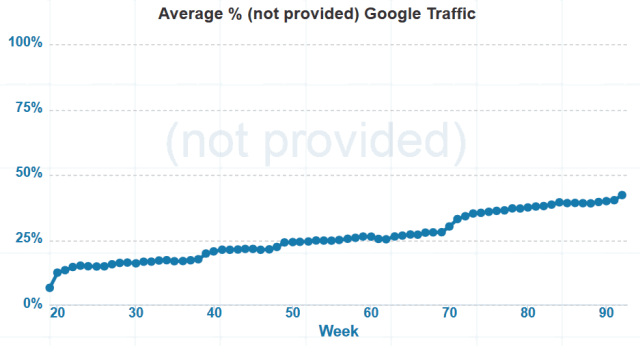
The site which provided a count for (not provided) recently displayed over 40% of queries as (not provided), but that percentage didn't include the large percent of mobile search users that were showing no referrals at all & were showing up as direct website visitors. On July 30, Google started showing referrals for many of those mobile searchers, using keyword (not provided).
According to research by RKG, mobile click prices are nearly 60% of desktop click prices, while mobile search click values are only 22% of desktop click prices. Until Google launched enhanced AdWords campaigns they understated the size of mobile search by showing many mobile searchers as direct visitors. But now that AdWords advertisers were opted into mobile ads (and have to go through some tricky hoops to figure out how to disable it), Google has every incentive to promote what a big growth channel mobile search is for their business.
Looking at the analytics data for some non-SEO websites over the past 4 days I get Google referring an average of 86% of the 26,233 search visitors, with 13,413 being displayed as keyword (not provided).
Hiding The Value of SEO
Google is not only hiding half of their own keyword referral data, but they are hiding so much more than half that even when you mix in Bing and Yahoo! you still get over 50% of the total hidden.
Google's 86% of the 26,233 searches is 22,560 searches.
Keyword (not provided) being shown for 13,413 is 59% of 22,560. That means Google is hiding at least 59% of the keyword data for organic search. While they are passing a significant share of mobile search referrers, there is still a decent chunk that is not accounted for in the change this past week.
Not passing keywords is just another way for Google to increase the perceived risk & friction of SEO, while making SEO seem less necessary, which has been part of "the plan" for years now.
Buy AdWords ads and the data gets sent. Rank organically and most the data is hidden.
When one digs into keyword referral data & ad blocking, there is a bad odor emitting from the GooglePlex.
Subsidizing Scammers Ripping People Off
A number of the low end "solutions" providers scamming small businesses looking for SEO are taking advantage of the opportunity that keyword (not provided) offers them. A buddy of mine took over SEO for a site that had showed absolutely zero sales growth after a year of 15% monthly increase in search traffic. Looking at the on-site changes, the prior "optimizers" did nothing over the time period. Looking at the backlinks, nothing there either.
So what happened?
Well, when keyword data isn't shown, it is pretty easy for someone to run a clickbot to show keyword (not provided) Google visitors & claim that they were "doing SEO."
And searchers looking for SEO will see those same scammers selling bogus solutions in AdWords. Since they are selling a non-product / non-service, their margins are pretty high. Endorsed by Google as the best, they must be good .
Google does prefer some types of SEO over others, but their preference isn’t cast along the black/white divide you imagine. It has nothing to do with spam or the integrity of their search results. Google simply prefers ineffective SEO over SEO that works. No question about it. They abhor any strategies that allow guys like you and me to walk into a business and offer a significantly better ROI than AdWords.
This is no different than the YouTube videos "recommended for you" that teach you how to make money on AdWords by promoting Clickbank products which are likely to get your account flagged and banned. Ooops.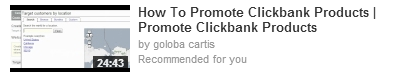
Anti-competitive Funding Blocking Competing Ad Networks
John Andrews pointed to Google's blocking (then funding) of AdBlock Plus as an example of their monopolistic inhibiting of innovation.
sponsoring Adblock is changing the market conditions. Adblock can use the money provided by Google to make sure any non-Google ad is blocked more efficiently. They can also advertise their addon better, provide better support, etc. Google sponsoring Adblock directly affects Adblock's ability to block the adverts of other companies around the world. - RyanZAG
Turn AdBlock Plus on & search for credit cards on Google and get ads.
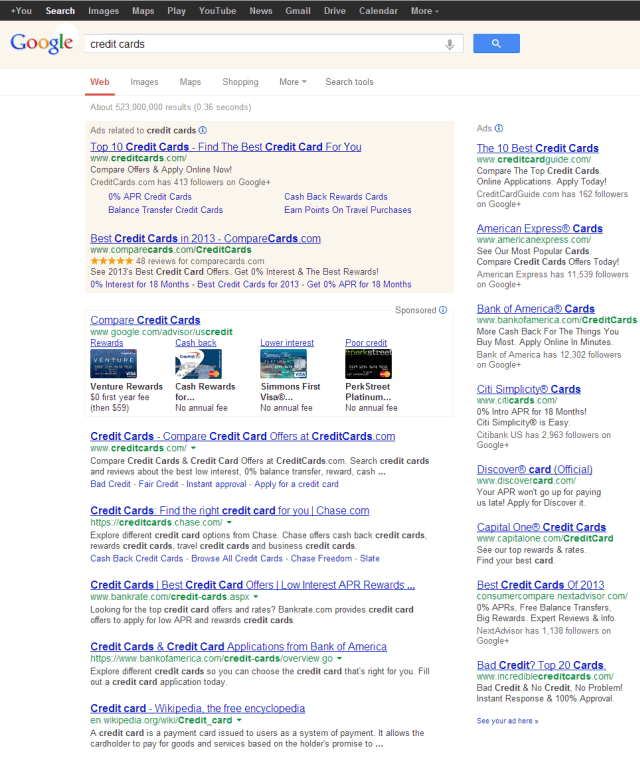
Do that same search over at Bing & get no ads.
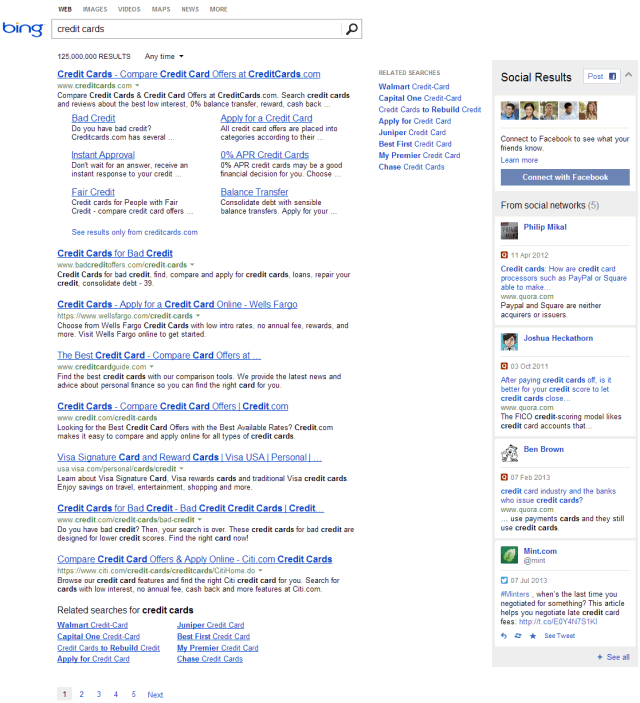
How does a smaller search engine or a smaller ad network compete with Google on buying awareness, building a network AND paying the other kickback expenses Google forces into the marketplace?
They can't.
Which is part of the reason a monopoly in search can be used to control the rest of the online ecosystem.
Buying Browser Marketshare
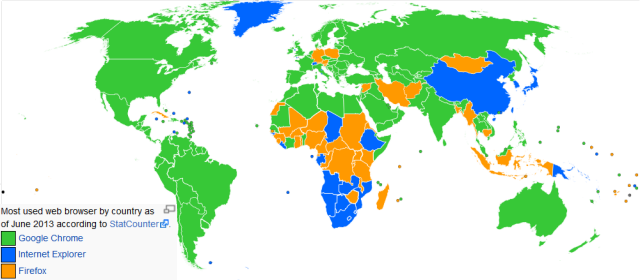
Already the #1 web browser, Google Chrome buys marketshare with shady one-click bundling in software security installs.
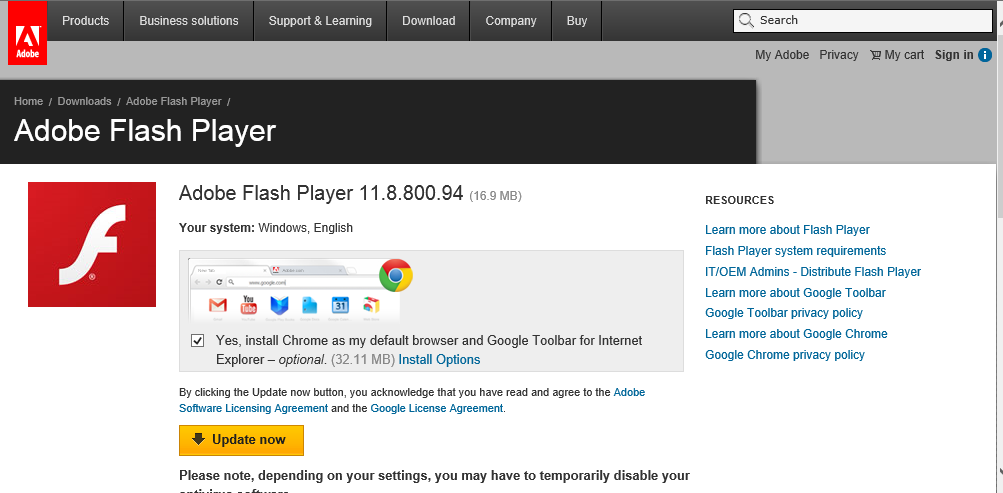
If you do that stuff in organic search or AdWords, you might be called a spammer employing deceptive business practices.
When Google does it, it's "good for the user."
Vampire Sucking The Lifeblood Out of SEO
Google tells Chrome users "not signed in to Chrome (You're missing out - sign in)." Login to Chrome & searchers don't pass referral information. Google also promotes Firefox blocking the passage of keyword referral data in search, but when it comes to their own cookies being at risk, that is unacceptable: "Google is pulling out all the stops in its campaign to drive Chrome installs, which is understandable given Microsoft and Mozilla's stance on third-party cookies, the lifeblood of Google's display-ad business."
What do we call an entity that considers something "its lifeblood" while sucking it out of others?

What Is Your SEO Strategy?

How do you determine your SEO strategy?
Actually, before you answer, let’s step back.
What Is SEO, Anyway?
“Search engine optimization” has always been an odd term as it’s somewhat misleading. After all, we’re not optimizing search engines.
SEO came about when webmasters optimized websites. Specifically, they optimized the source code of pages to appeal to search engines. The intent of SEO was to ensure websites appeared higher in search results than if the site was simply left to site designers and copywriters. Often, designers would inadvertently make sites uncrawlable, and therefore invisible in search engines.
But there was more to it than just enhancing crawlability.
SEOs examined the highest ranking page, looked at the source code, often copied it wholesale, added a few tweaks, then republished the page. In the days of Infoseek, this was all you needed to do to get an instant top ranking.
I know, because I used to do it!
At the time, I thought it was an amusing hacker trick. It also occurred to me that such positioning could be valuable. Of course, this rather obvious truth occurred to many other people, too. A similar game had been going on in the Yahoo Directory where people named sites “AAAA...whatever” because Yahoo listed sites in alphabetical order. People also used to obsessively track spiders, spotting fresh spiders (Hey Scooter!) as they appeared and....cough......guiding them through their websites in a favourable fashion.
When it comes to search engines, there’s always been gaming. The glittering prize awaits.
The new breed of search engines made things a bit more tricky. You couldn’t just focus on optimizing code in order to rank well. There was something else going on.
So, SEO was no longer just about optimizing the underlying page code, SEO was also about getting links. At that point, SEO jumped from being just a technical coding exercise to a marketing exercise. Webmasters had to reach out to other webmasters and convince them to link up.
A young upstart, Google, placed heavy emphasis on links, making use of a clever algorithm that sorted “good” links from, well, “evil” links. This helped make Google’s result set more relevant than other search engines. Amusingly enough, Google once claimed it wasn’t possible to spam Google.
Webmasters responded by spamming Google.
Or, should I say, Google likely categorized what many webmasters were doing as “spam”, at least internally, and may have regretted their earlier hubris. Webmasters sought links that looked like “good” links. Sometimes, they even earned them.
And Google has been pushing back ever since.
Building links pre-dated SEO, and search engines, but, once backlinks were counted in ranking scores, link building was blended into SEO. These days, most SEO's consider link building a natural part of SEO. But, as we've seen, it wasn’t always this way.
We sometimes get comments on this blog about how marketing is different from SEO. Well, it is, but if you look at the history of SEO, there has always been marketing elements involved. Getting external links could be characterized as PR, or relationship building, or marketing, but I doubt anyone would claim getting links is not SEO.
More recently, we’ve seen a massive change in Google. It’s a change that is likely being rolled out over a number of years. It’s a change that makes a lot of old school SEO a lot less effective in the same way introducing link analysis made meta-tag optimization a lot less effective.
My takeaways from Panda are that this is not an individual change or something with a magic bullet solution. Panda is clearly based on data about the user interacting with the SERP (Bounce, Pogo Sticking), time on site, page views, etc., but it is not something you can easily reduce to 1 number or a short set of recommendations. To address a site that has been Pandalized requires you to isolate the "best content" based on your user engagement and try to improve that.
Google is likely applying different algorithms to different sectors, so the SEO tactics used in on sector don’t work in another. They’re also looking at engagement metrics, so they’re trying to figure out if the user really wanted the result they clicked on. When you consider Google's work on PPC landing pages, this development is obvious. It’s the same measure. If people click back often, too quickly, then the landing page quality score drops. This is likely happening in the SERPs, too.
So, just like link building once got rolled into SEO, engagement will be rolled into SEO. Some may see that as a death of SEO, and in some ways it is, just like when meta-tag optimization, and other code optimizations, were deprecated in favour of other, more useful relevancy metrics. In others ways, it's SEO just changing like it always has done.
The objective remains the same.
Deciding On Strategy
So, how do you construct your SEO strategy? What will be your strategy going forward?
Some read Google’s Webmaster Guidelines. They'll watch every Matt Cutts video. They follow it all to the letter. There’s nothing wrong with this approach.
Others read Google’s Guidelines. They'll watch every Matt Cutts video. They read between the lines and do the complete opposite. Nothing wrong with that approach, either.
It depends on what strategy you've adopted.
One of the problems with letting Google define your game is that they can move the goalposts anytime they like. The linking that used to be acceptable, at least in practice, often no longer is. Thinking of firing off a press release? Well, think carefully before loading it with keywords:
This is one of the big changes that may have not been so clear for many webmasters. Google said, “links with optimized anchor text in articles or press releases distributed on other sites,” is an example of an unnatural link that violate their guidelines. The key are the examples given and the phrase “distributed on other sites.” If you are publishing a press release or an article on your site and distribute it through a wire or through an article site, you must make sure to nofollow the links if those links are “optimized anchor text.
Do you now have to go back and unwind a lot of link building in order to stay in their good books? Or, perhaps you conclude that links in press releases must work a little too well, else Google wouldn’t be making a point of it. Or conclude that Google is running a cunning double-bluff hoping you’ll spend a lot more time doing things you think Google does or doesn’t like, but really Google doesn’t care about at all, as they’ve found a way to mitigate it.
Bulk guest posting were also included in Google's webmaster guidelines as a no no. Along with keyword rich anchors in article directories. Even how a site monetizes by doing things like blocking the back button can be considered "deceptive" and grounds for banning.
How about the simple strategy of finding the top ranking sites, do what they do, and add a little more? Do you avoid saturated niches, and aim for the low-hanging fruit? Do you try and guess all the metrics and make sure you cover every one? Do you churn and burn? Do you play the long game with one site? Is social media and marketing part of your game, or do you leave these aspects out of the SEO equation? Is your currency persuasion?
Think about your personal influence and the influence you can manage without dollars or gold or permission from Google. Think about how people throughout history have sought karma, invested in social credits, and injected good will into their communities, as a way to “prep” for disaster. Think about it.
We may be “search marketers” and “search engine optimizers” who work within the confines of an economy controlled (manipulated) by Google, but our currency is persuasion. Persuasion within a market niche transcends Google
It would be interesting to hear the strategies you use, and if you plan on using different strategy going forward.
Authority Labs Review

There are quite a few rank tracking options on the market today and selecting one (or two) can be difficult. Some have lots of integrations, some have no integrations. Some are trustworthy, some are not.
Deciding on the feature set is tough enough but you also need to take into account who is storing your data. Can you trust that person or company? Will they use your aggregate data in a blog post (which is a signal that they are using your data for their own gains) or use your data to out a client of yours? Decisions, decisions...
What I Use
I use and recommend 2 services; one is web-based and one is software-based (where I have full control over the data). The software version is quite robust and has many integrations and options (that you may not need). This review covers my recommended web-based platform, Authority Labs.
I use Authority Labs for most rank checking reports and I find it to be a wonderfully powerful web-based tool that is super easy to use. My recommended software package is Advanced Web Ranking. AWR is what I use for really in-depth analysis of pretty much everything (rankings, analytics, links, competitive analysis, etc.). If you are interested in learning a bit more, check out our Advanced Web Ranking review.
In-depth analysis doesn't need to occur every day, but overviews of overall ranking health does. Daily, aggregate spot checks will help you spot large-scale changes quickly. Be consistently proactive with your clients and your own sites is quite a bit better than always being reactive.
Benefits of the Two Tool Approach
The benefits of this approach are that I get a locally-owned copy of my data and all the options I'd ever need while getting a reliable, hassle-free web-based copy that updates daily and is really easy to report on and/or give clients access to ranking reports if needed.
Some clients require more in-depth reporting as a whole and you should strive to make yourself way more valuable than just a ranking report hand-off company, but if you are rolling your own reports and mashing data together then Authority Labs can really make your life quite a bit simpler.
With Authority Labs and Advanced Web Ranking I get the best of both worlds and redundancy. It's a beautiful thing.
What Does Authority Labs Do?
It's a rank tracking application, plain and simple. Some of the main features I use most of the time are:
- Tracking keywords daily
- Tracking Google, Bing, and Yahoo SERPs
- Viewing estimated search volume (via a bar graph) for your tracked keywords
- Selecting a location all the way down to the zip code
- Viewing daily ranking charts for a selected keyword
- Exporting PDF reports for monthly, weekly, quarterly, *since added* date, and/or daily comparison reports
- Comparing rankings against a competitor
- Sharing a public URL with a client for their project
- Exporting one domain or an entire account history in CSV format as part of a backup process
- Producing white label reports
The local feature is quite nice as well. It will track as if the search is occurring in that particular location (obviously really, really helpful for locally based keywords).
Another feature that I really like is the "results type" column:
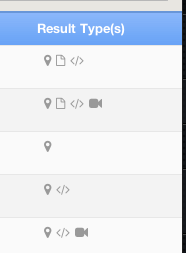
In this column, which appears next to the keyword, it will show you if any of the following items appeared in that SERP:
- Image results
- News results
- Video results
- Shopping results
- Snippets
- Google Places results
There are some other solid features as well but the ones mentioned above are some of my favorites.
Working with Domains
Authority Labs gives us the ability to do a few nifty things with domains. We can:
- Group domains
- Sync domains
- Tag domains
In order to understand how best to use the domain categorization features we have to understand how domain tracking works in the application. You can utilize specific URL, subdomain, or root domain tracking and also introduce wildcards to track more in-depth site structures.
Some general rules of thumb:
- If you choose a subdomain it will not track the root and beyond, only what's housed under the sub-domain structure
- If you choose a root domain, it will track sub-domains and sub-pages across the root and any sub-domains
- If you add just a site.com/folder it will only track that folder and down
- If you add just a site.com/folder/page it will track just that page
- If you use a wild card like site.com/wildcard/something it will track anything on the root and on any sub-domains that have "something" as a folder or page name preceded by a category or folder
You can tag to your hearts content but it can get a bit unwieldy so I'd recommended using the solution that works best for your set up.
Personally I like the ability to use grouping to group my sites/client sites and competing sites while relying on tagging to determine whether it's a client site, a site I own, and the market it is in (finance, ecommerce, SEO, whatever). This way I can quickly see a client-specific group, my own sites separated out, and then drill down into a particular market/core keyword to see the competing sites and such. Remember that when you sync domains together to track against each other, they reside in their own group.
I also like the ability to group domains that might not be a direct competitor and tag them as "watch" just to track their growth and then try and reverse engineer the strategy.
These options offer a lot of flexibility and there's no real wrong way to use them, I just recommended really thinking through how you want to organize things prior to moving things around in the interface.
Adding a Domain
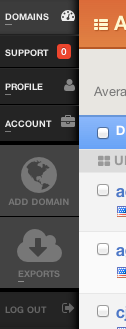
Adding a domain is simple. Click on domains and then add a domain in the sidebar on the left:
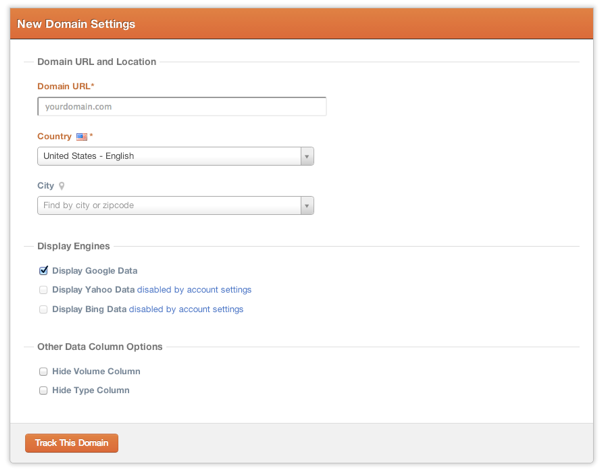
From here, you add the domain (or subdomain, page, domain with wildcard, etc) and select what engines to track, what options to show, and what location (if any) to search from:
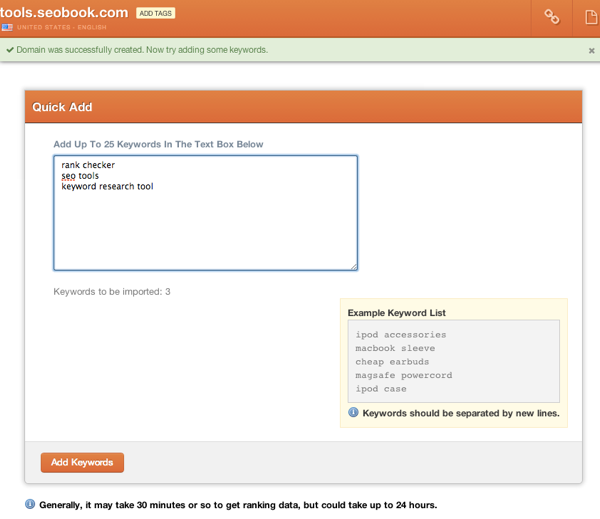
Next up is adding the keywords to the domain, up to 25 at a time (otherwise you should use the import function):
After I add a site my workflow usually is to add tags to the domain, add competing sites, then group them. So here is the ranking interface of a specific domain:
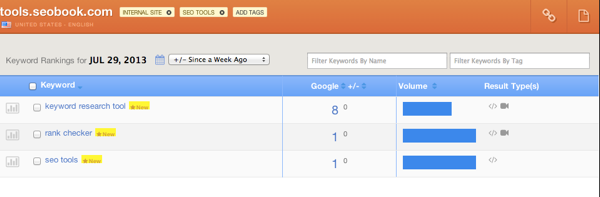
You can see in the upper left where you can add tags, the link in the upper right is for the publicly shareable link, the paper icon is for a PDF report of what you see on the screen + time frame selected, and you can see where you can filter keywords by tag or name.
The time frames available:
- Compared to previous day
- Compared to previous week
- Compared to previous month
- Compared to 3 months ago(quarterly)
- Compared to date added
So then I'd add the competing sites in the same way, except with different tags. Keep in mind that when you want to add competing sites with yours they have to have the same keyword sets (no more, no less).
If you want to do a lot of specific competitor tracking across the entire breadth of your site's keywords then you can utilize the grouping and tagging features mentioned above to split them off into relevant buckets. Keep in mind that any synced domains will also belong to their own group (the domains that are synced are grouped together)
When you are in the domain interface you can see average rank based on time period selected (same as time periods above) and filter by domain name and tag:

Here's what a domain looks like in this overview area:

Overall average rank is 7 for all the keywords and +6 since last week (as that is the time frame selected).
Grouping and Syncing Domains
After adding the domains, their keywords, and tagging them you can then group them as needed. Back on the domain overview page you can see my ungrouped domains for this particular review:
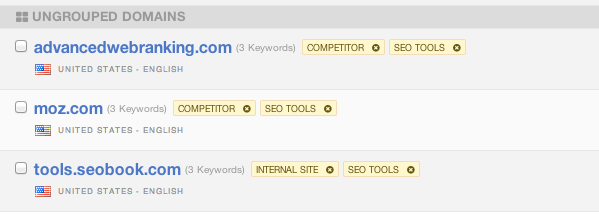
To group or sync them just check off the boxes and click group in the left sidebar.

Once they are synced you just go back to the domain overview, click on the group name where the domains are synced, and you get the keywords side by side with the synced domains.
Working with Keywords
To add up to 25 keywords to a project just get into the domain and click add keywords on the left. If you need to bulk upload keywords you can click on the bulk upload button and the instructions are there for you:
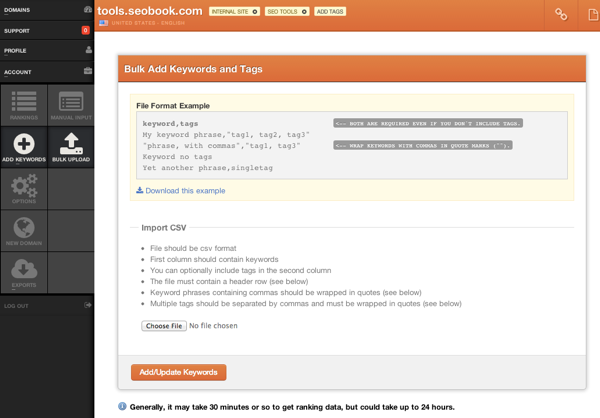
If you click on a keyword the tag dialog comes up on the left. If you have a large keyword list and you aren't using the domain strategies mentioned above, tagging keywords certainly makes sense.
You can also filter keywords by tags and keyword names (just the keyword itself).
Another thing you can do with keywords is to click on the graph to the left of the keyword to see a daily history over the course of a month, 3 months, 6 months, and 1 year.
You can click on multiple keywords to graph them together. This is helpful when diagnosing ranking nosedives (or upticks of signifigance). If you are tracking multiple engines you can switch between them too
Reporting
There are 3 types of reporting options available:
- Excel
- Shareable URL
PDF's are available in the upper right of the domain landing page and the report will show the changes relative to the time frame selected on the screen. Again, the time frames available are:
- Compared to previous day
- Compared to previous week
- Compared to previous month
- Compared to 3 months ago(quarterly)
- Compared to date added
If you want to compare a specific date range outside of the above, you'll get an excel download. This is something I hope they can update in the future to be a bit more robust with PDF reporting.
The excel download is really just an export (as described in the next section) for a specific time period with day by day numbers. So if you exported for a 30 day period you'd get the rank for each keyword on each day in Excel format.
You can also white label reports, which is standard in just about all rank tracking/reporting applications.
Importing and Exporting
Currently you can only import keywords as described above, you cannot import historical data (they did offer a Raven import back when Raven shut down Rank Tracking) from another application yet.
Exporting is easy, you can choose 1 domain or all domains and a specific time frame:
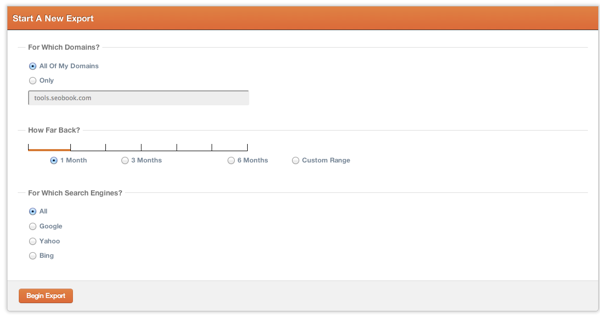
Whatever date range you select here will result in day by day ranking positions (the excel report mentioned above). This is one (kind of clunky) way to compare specific dates. In fairness, the date ranges they give you for onsite viewing and PDF downloads really do cover a good percentage of the date ranges you'd need to figure out what was going on. Still, it would be nice to have more granular comparison options.
Access Levels
You can do the following with access levels:
- Add someone to your team (they get access to selected domains in your account)
- If you add them as an Admin they can manage the entire account
- Create a new "Team" and give that team access to specific domains only and add people to that team only (great for clients)
Wrapping Up
Another great feature is that 1 keyword only counts once even if you are tracking competitors with those keywords and using the 3 engines. This really makes it cost-effective to track pretty much everything you want to track.
There are some improvements that I'd like to see (analytics integration, link integration, and some more granular reporting options) but for a web-based rank tracker Authority Labs is my tool of choice.
Give them a try, they have a generous 30 day free trial with rather solid pricing.
A Beginner's Guide to Ghost
The Ghost team knew that there were many people whom WordPress was serving poorly. Their perception: Some people just want to blog. It's a "friendly" blogging platform that offers an alternative to WordPress's kitchen sink approach.


Wednesday, October 30, 2013
Google Webmaster Tools Now Highlights Security Issues
A new section within Webmaster Tools offers a portal for "Security Issues" to alert webmasters when they have a security issue or evidence that a site has been hacked, as well as give more detailed information on the nature of the issue.


Subscribe to:
Comments (Atom)